
Every online action leaves behind traces of information. These traces form a digital footprint that can reveal more about you than many people realize. Understanding what makes up your digital footprint can help reduce privacy risks.
What you need to know:
- Your digital footprint is the collection of data created through your online activity and device usage
- Social media, apps, websites, search history, and online accounts all contribute to your footprint
- Some information is shared intentionally, while other data is collected passively through tracking technologies
- Large digital footprints can increase privacy, profiling, phishing, and identity theft risks
- Reviewing privacy settings, limiting oversharing, and removing unused accounts can reduce exposure
- Completely erasing a digital footprint is difficult, but it can be significantly reduced over time
What is a digital footprint?
A digital footprint is the trail of information created by your activity online. It includes data you intentionally share (things like social media posts or account signups), as well as information collected automatically through websites and tracking technologies.
Sometimes called a digital shadow or online footprint, this data shapes your wider digital reputation. Every connected device interaction can contribute to the picture organizations, companies, and even cybercriminals build about you online.
Some parts of a digital footprint are created deliberately. Things like joining online services or publishing comments all leave visible traces. Other parts are collected passively in the background through cookies and app permissions.
These pieces of information accumulate across platforms and services. Even small details can combine to reveal patterns. This can unveil your identity or show your behaviors online. This can be an example of piecing together parts of a digital footprint.
What are examples of a digital footprint?
A digital footprint includes both the information you actively share online and the data collected automatically while you browse and go about your daily web use.
Common examples of an online footprint include:
- Social media posts, likes, comments, and shares
- Emails, messages, and forum discussions
- Online shopping activity and purchase history
- Account signups for apps, websites, newsletters, or streaming services
- Uploaded photos and videos stored on social platforms or cloud services
- Search history and browsing behavior across websites
- Mobile app activity, including fitness, navigation, or weather apps
- Cookies that track website visits and preferences
- IP addresses collected when connecting to websites or online services
- Location tracking from smartphones, apps, and connected devices
Some examples are obvious, such as posting photos publicly or commenting on a forum. Others happen quietly in the background. Some websites may collect browsing patterns through cookies. Mobile apps can gather location or usage data automatically.
These activities build a broader picture of your habits and online behavior.
What is the difference between active and passive digital footprints?
A digital footprint is usually divided into two categories: active and passive data.
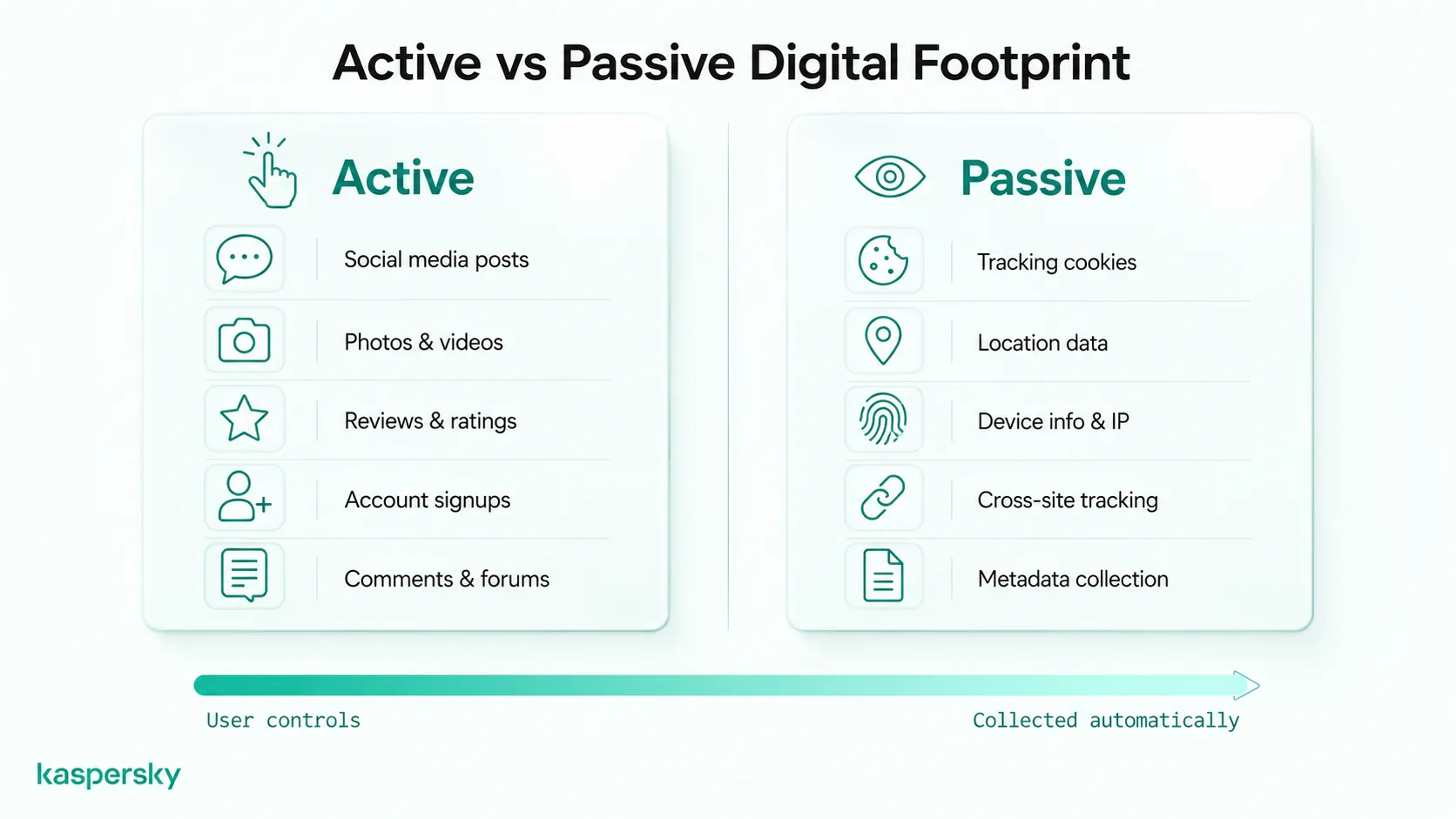
An active digital footprint is created through information people intentionally share online. This includes actions such as:
- Posting on social media
- Uploading photos or videos
- Sharing content with others
- Commenting on blogs, forums, or videos
- Signing up for online accounts or newsletters
- Leaving reviews or ratings
- Agreeing to website cookies or terms while logged into an account
A passive digital footprint is created when information is collected automatically during online activity, often without the user realizing it. This can include:
- Websites tracking visits and browsing behavior
- Collection of IP addresses and device information
- Cookies recording activity and preferences
- Apps gathering location or usage data in the background
- Metadata attached to photos, messages, or files
- Tracking across websites and connected devices
The key difference is control. Active footprints come from choices users knowingly make. Passive footprints are often generated automatically through digital systems and tracking technologies.
Why is your digital footprint important?
A digital footprint matters because online information can affect privacy and security. It can even impact reputation in the real world. The data connected to your accounts and online activity helps shape how companies and even other people understand and respond to you online.
Digital footprints can influence everything from the ads you see to how easily someone can target you with scams or impersonation attempts. Public information can also affect personal relationships or professional reputation long after it was originally shared. Once data is public, the owner has little control over how others will use it.
Even small pieces of data can become significant when combined across platforms and services.
How do companies and advertisers use your data?
Companies use digital footprint data to personalize content. This includes recommended products and targeted advertising. Other data points such as browsing activity, shopping habits, app usage, and search behavior all help build consumer profiles that influence what users see online.
Some information may also be shared with advertising partners or third-party data companies. Data brokers and people-search websites can collect information from multiple sources to create detailed profiles containing a range of personal details.
Can employers, schools, or other people see your digital footprint?
Yes. Public posts, photos, and online activity can often be viewed by employers or other individuals.
For example, an old social media post or photo shared years earlier may still appear in search results or screenshots long after it was originally posted. Content intended for a small audience can also spread beyond its original context through reposts or sharing.
This does not mean people should avoid participating online, but it does highlight how digital content can shape impressions over time.
How can hackers use your digital footprint?
Cybercriminals can use publicly available information to make scams more convincing and targeted. Details such as names and other personal information can help attackers with purposes such as phishing for account access or creating false identities based on your data.
Oversharing on social media may also expose answers to security questions or personal information useful for identity theft. If account credentials are exposed in a data breach, attackers may combine that information with other public data to attempt account takeovers or fraud.
The more information available online, the easier it becomes for attackers to create convincing scams, guess personal details, or exploit weak account security.
Why can your digital footprint be hard to erase?
Information shared online often remains available longer than people expect. Even after deleting something, copies may still exist elsewhere.
Understanding how to manage your digital footprint helps you to know what steps to take. Unfortunately, not everything can be removed.
Search engines can retain cached versions of pages. Some websites store backups, and screenshots or archived copies can continue circulating online. Data brokers and third-party databases may also keep collected information long after the original source is removed.
Completely erasing a digital footprint is difficult. In most cases, the more realistic goal is reducing unnecessary exposure and building safer long-term online habits.
How does a digital footprint work?
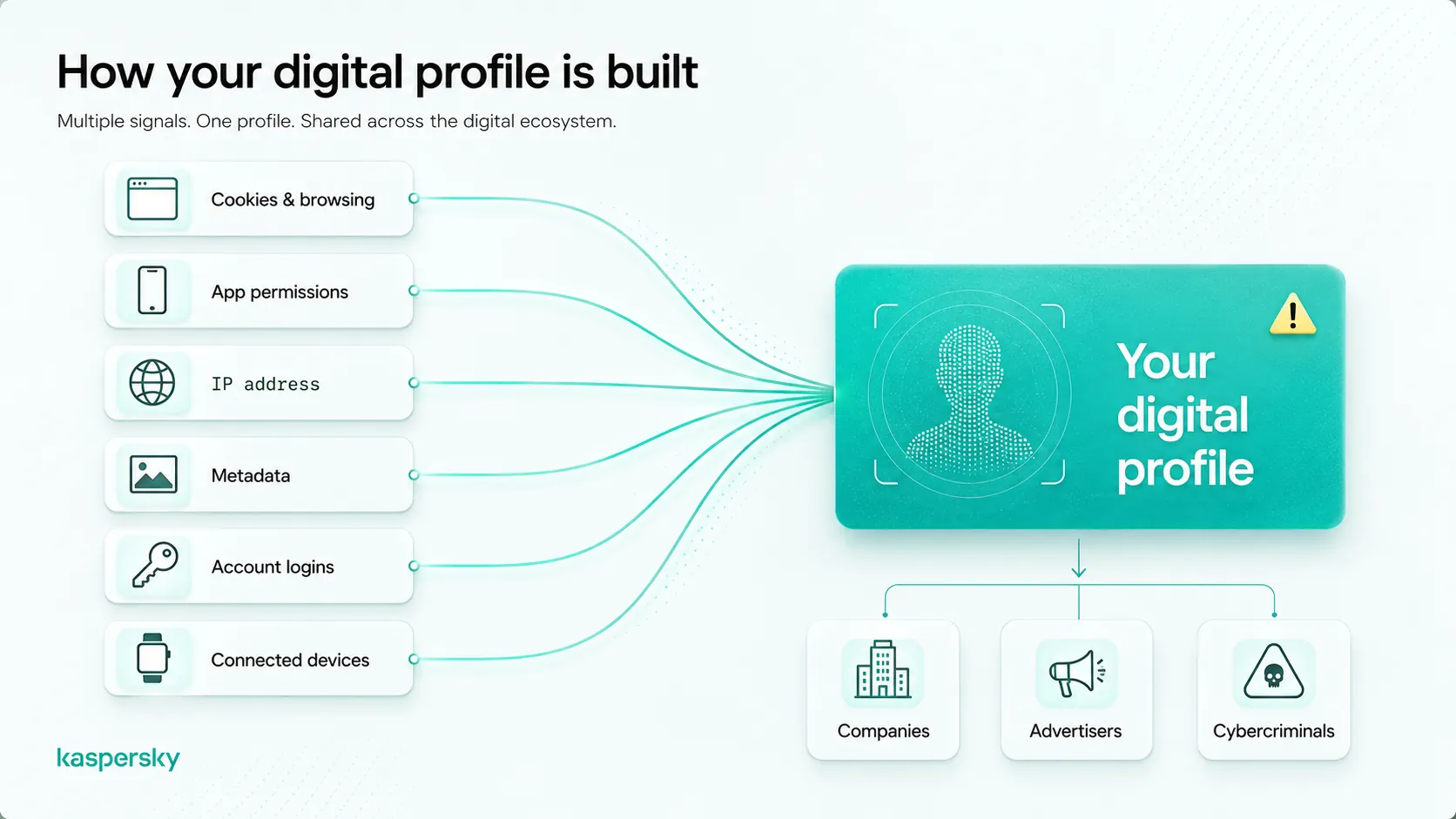
A digital footprint works by collecting information from your online activity over time. Websites, apps, and devices can connect actions like browsing, purchases, account logins, or location data to build a record of your online behavior.
These pieces of information can be linked together. Data collected from browsing, apps, accounts, and devices can be stored and reused to build profiles that reflect habits, interests, preferences, and behavior patterns. Online activity gradually becomes part of a broader digital record.
How is your digital footprint collected?
Digital footprints are collected through both direct interactions and background tracking technologies. Some information is provided willingly and intentionally (like filling in a form). Other data is gathered automatically during everyday online activity.
Understanding how digital footprints are collected helps you to understand how to protect digital privacy.
Common collection methods include cookies, browser tracking tools, IP addresses, metadata, account logins, and app permissions. Connected devices such as smartphones, smart TVs, fitness trackers, and voice assistants can also contribute to data collection by recording activity, location, or usage patterns.
Websites may record browsing activity through cookies. Apps may collect location or usage data through permissions provided on your device. Account logins can even connect activity across multiple devices.
Metadata includes device information or location details attached to photos and messages. This can add additional context to Personally Identifiable Information (PII).
Third parties may also combine information from different sources to create broader profiles. Data from numerous sources and connected devices can sometimes be linked together to build a more complete picture of online behavior across platforms. This makes it even more crucial to know how to protect personal information online.
How can you protect your digital footprint?
Protecting a digital footprint is less about disappearing from the internet and more about limiting what personal information is publicly visible. Every online interaction creates data points that can be collected or stored over time.
The most effective approach combines quick privacy improvements with stronger account security, and regular reviews of the information connected to your online life. Small actions taken consistently often have a greater impact than one large cleanup.
What are the best ways to reduce your digital footprint?
Use this practical checklist to reduce exposure and regain more control over your online information:
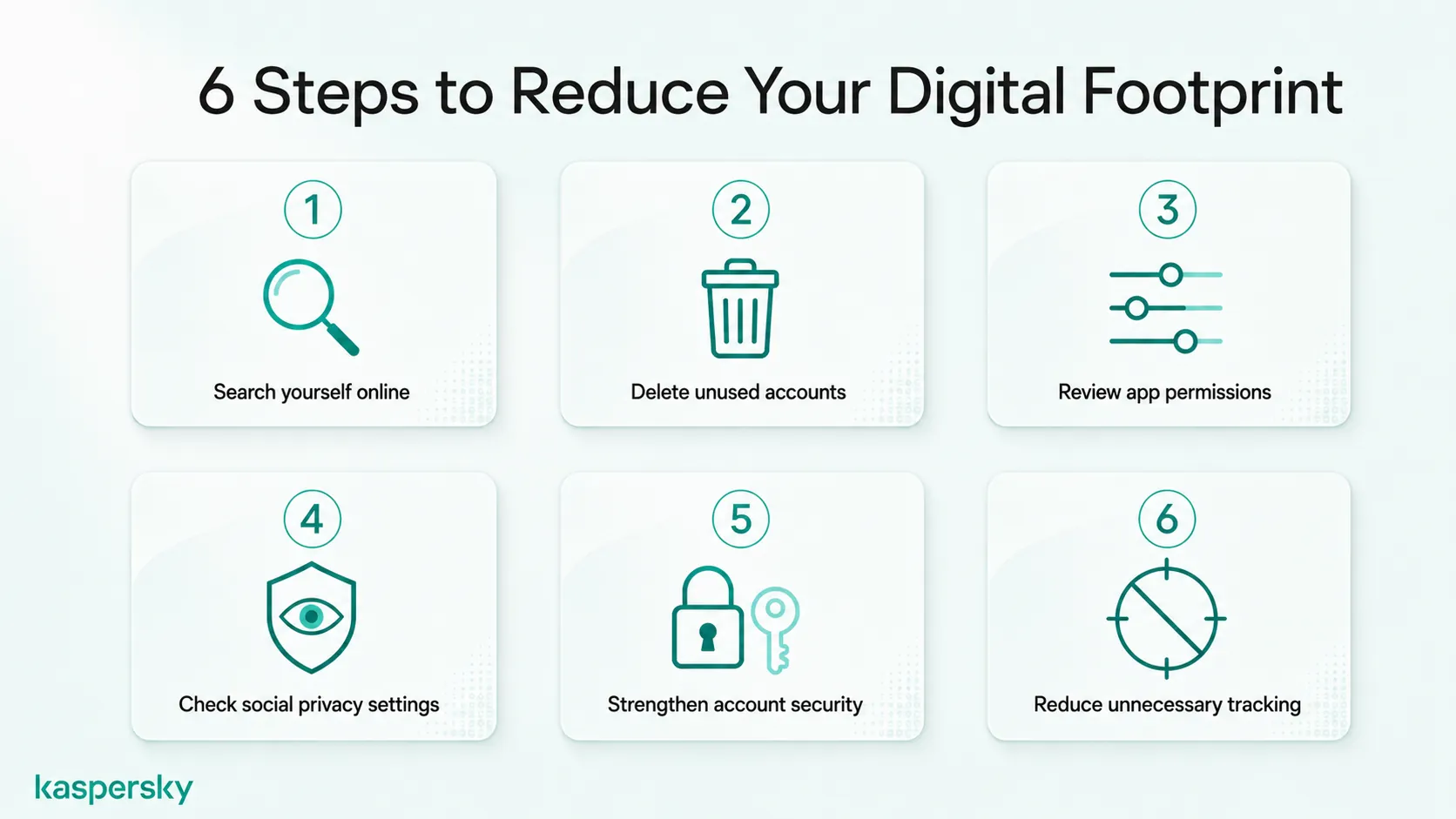
- Search yourself online. Search your name and email addresses in search engines. Look at what appears publicly. This will likely include old accounts and online activity. Many people discover forgotten information they did not realize was still visible.
- Delete unused accounts. Old shopping accounts, forums, gaming profiles, and apps often remain online for years collecting data. Removing forgotten accounts reduces the amount of personal information stored across the internet.
- Review app permissions. Many apps request more access than they need. Check permissions for location, contacts, microphone, camera, and photos. A simple app probably does not need access to your contact list or precise location.
- Review social media privacy settings. Check who can see your activity and content. Restricting visibility can reduce how much information strangers or search engines can access.
- Use stronger account security. Use a unique password for every account and enable multi-factor authentication (MFA). Reused passwords increase the impact of data breaches because one compromised login can unlock multiple accounts.
- Reduce unnecessary tracking. Use guest checkout when possible instead of creating accounts. You may also avoid using social logins for every service and consider email aliases for certain signups to limit long-term exposure.
The ability to manage your digital footprint is ongoing rather than a one-time activity.
Which tools help protect your digital footprint?
Privacy settings and habits matter. The right tools can also reduce risk and simplify protection.
A VPN helps hide your IP address and reduces visibility into browsing activity, particularly on public networks. Password managers make it easier to create and store unique passwords without relying on memory. Multi-factor authentication adds another layer of protection if passwords are exposed.
Breach monitoring tools can also alert users if account details appear in known data leaks. Privacy-focused browsers and tracking protections can also limit how much information websites collect during everyday browsing.
Security tools cannot instantly erase a digital footprint. They can help reduce exposure and strengthen long-term privacy protection.
Protect your privacy
Kaspersky Premium combines security, privacy, password management, and monitoring tools in one place, helping users manage risks linked to digital footprint exposure and online activity.
Try Premium for FreeHow can you make social media and apps more private?
Social media and mobile apps often reveal more information than people expect. Many platforms share profile details as well as things like location settings by default.
Review who can view your posts and whether profiles appear in public searches. On mobile devices, check whether apps have continuous access to your contacts or location services.
A social app may only need location access while actively in use rather than all day. Small setting changes like these can significantly reduce background data collection over time.
Don’t forget that platforms and apps frequently change features. Regular reviews are worth making part of a routine.
Can you delete your digital footprint?
Not completely. Once information reaches the internet, full removal is often unrealistic because copies can remain in multiple places.
Reducing a digital footprint is absolutely possible. The goal is not perfection. It is reducing unnecessary exposure and future data collection.
What can you realistically remove?
Many parts of a digital footprint can be reduced with practical actions.
Delete unused accounts that no longer serve a purpose. Remove outdated posts, photos, or public content that no longer reflects what you want visible online. Some websites and platforms also allow users to request content removal or submit takedown requests.
People-search websites and data brokers often provide opt-out processes that remove personal listings from public databases. Privacy settings can also limit how much future information becomes publicly visible.
Small changes may not erase everything. They can gradually reduce how much personal information is publicly available online.
Why does deleted information sometimes stay online?
Deleted information may remain online because copies can still appear in cached pages, screenshots, archives, or third-party databases
A deleted social media post may still appear in an archived webpage or survive as a screenshot shared elsewhere. Search engines can also temporarily display cached versions of removed content.
Deleted content can remain accessible long after the original source disappears. That is why reducing future exposure is often more realistic than trying to erase every trace of past activity.
How can parents protect a child’s digital footprint?
Children can begin building a digital footprint long before they fully understand privacy or how information spreads online. App accounts, gaming profiles, school platforms, and everyday online activity can all create lasting digital records from an early age. Parents may also contribute to a child’s digital footprint by sharing photos, milestones, or personal details online.
Parents do not need to remove children from technology completely. The goal is helping children develop safer habits early while helping them build healthier privacy habits as they grow.
What is sharenting?
Sharenting describes parents sharing personal details about their children online. Family updates like school achievements and holiday posts can seem harmless, but they can create a detailed digital record before a child can choose what they want shared.
This does not mean parents should stop posting family moments. It simply helps to think about how much information is included. Details such as full names, school uniforms, locations, birthdays, or daily routines can reveal more than expected and may contribute to privacy or identity risks later.
How can families build safer digital habits?
Strong digital habits work best when they become part of everyday family routines rather than occasional rules. Small conversations often have more impact than one serious talk.
Encourage children to think before posting and explain why not everything needs to be shared publicly. Use parental controls where appropriate. Enable privacy settings on apps and devices, and protect family accounts with strong passwords and multi-factor authentication.
Families should treat online privacy as an ongoing skill rather than a warning. Building awareness early helps children grow into more confident and informed digital users.
Related Articles:
- How does privacy exposure online affect your digital footprint?
- Learn more about Hackers and your online privacy
- What are the main concerns regarding social media privacy today?
- How to stop data brokers from selling your personal information effectively?
Related Products:
FAQ
Can someone find personal information through your digital footprint?
Yes. Public posts, old accounts, data broker listings, and exposed personal details can all contribute to information being found online through searches or profiling.
How long does a digital footprint last?
A digital footprint can last for years or even permanently. Content may remain online through backups, screenshots, archives, cached pages, or third-party databases even after deletion.
Does deleting social media remove your digital footprint?
Deleting social media accounts can reduce your digital footprint, but it may not remove everything. Copies of posts or other information can still exist elsewhere online.
Can you check what your digital footprint looks like?
Yes. Searching your name and other personal details like usernames online can help reveal what information about you is publicly visible.